How to start Mozilla Thunderbird in safe mode?
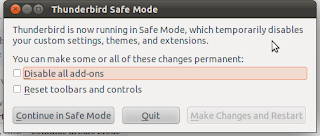
Steps to start Mozilla Thunderbird in safe mode : If Thunderbird is not running: Start Thunderbird in Safe Mode by holding down the Shift key while starting the application. If Thunderbird is already running: At the top of the Thunderbird window, click the Help menu, select the Restart with Add-ons Disabled… menu item and then click the Restart button in the dialog box. The Thunderbird Safe Mode dialog opens: Click on the Continue in Safe Mode button to finish. Confirming that Mozilla Thunderbird Safe Mode is activated To confirm that Thunderbird is running in Safe Mode, click the Tools menu and then click Add-ons and Extensions . Above your list of add-ons, there will be a banner displayed stating that Thunderbird is in Safe Mode. Exiting Safe Mode Close down Thunderbird completely: At the top of the Thunderbird window, click the File menu and select the Exit ...