How to configure an SMTP server in Mozilla Thunderbird?
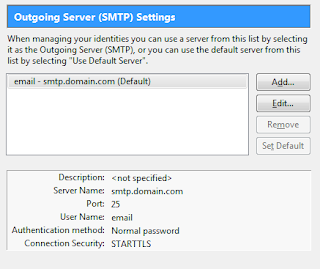
To set up a mail client it’s necessary to configure an SMTP server that will take care of the delivery of your emails. Luckily, the configuration of SMTP servers is generally very easy – you will simply have to open your email software and add the right SMTP parametres in the settings windows. Steps to configure SMTP Server : 1 . Select the voice “Account Settings” in your mail client, generally in the “Tools” menu. 2 . Choose the “Outgoing server (SMTP)” voice: 3 . Push the “Add…” button in order to set a new SMTP. A popup window will appear: 4 . Now simply fill the voices as follows: Description : an informal name that you will decide to identify the server (best to use the email provider’s, like Gmail or Yahoo). Server Name : the actual SMTP server’s specification. Port : usually SMTP works with port 25, but as the screenshot shows it can work also with 587. Connection security : in itself, SMTP email transfer doesn’t provide an encry...