How to add a Thunderbird email signature in the body of a new message?
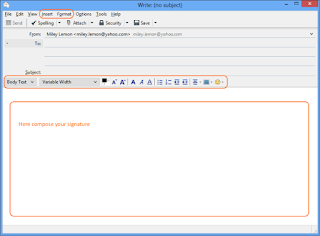
You can also design your email signature in the new message body by using available formatting tools. Thanks to this method, you can see the result right away and modify any part of the signature if necessary. Learn more on how to achieve that by following the steps below: Open Mozilla Thunderbird. Go to the top menu and open a new message by clicking the Write button. In the new message window, you can compose your email signature using a basic toolbar or, to adjust it to your needs, you can use available formatting options under the Insert and Format tabs as well. Once the signature is composed, select all in the email body. You can do that by pressing the combination of Crtl+A on the keyboard or going to the Edit tab and then clicking the Select All option. Once the whole signature has been selected, go to the Insert tab and then click the HTML… option. In a new pop-up window, you should see yo...